

Everyone knows Apple Silicon Macs have incredible battery life. The M-series chips are efficient, the hardware is optimized, and somehow your MacBook lasts all day while doing things that would have drained an Intel Mac in two hours. But there’s a crucial piece of the battery life story that rarely gets mentioned: it’s not just the chip architecture itself. It’s how macOS ruthlessly keeps power-hungry work off the cores you’re actually using.
The secret sits in those Efficiency cores—the ones Apple doesn’t talk about much in keynotes because “Performance” cores sound more impressive. While everyone focuses on how fast the P cores run, the real battery magic happens because your Mac is constantly routing dozens of background tasks to completely separate E cores that use a fraction of the power. Spotlight indexing, Time Machine backups, Siri processing, PDF rendering, media analysis—all of it runs invisibly on cores designed to sip power while your actual work happens elsewhere.
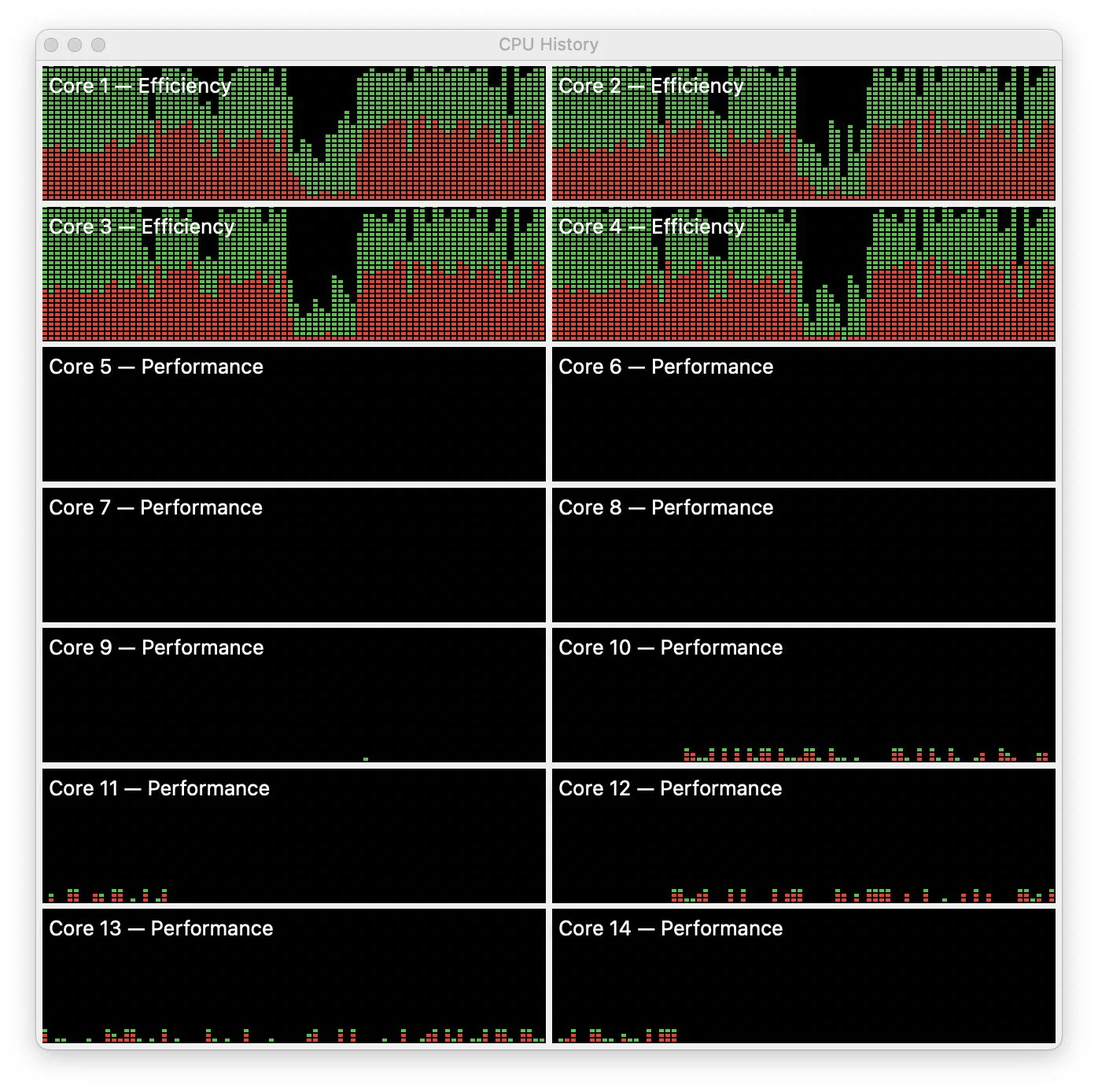
You can see this in action if you open Activity Monitor right after a cold boot. For the first five to ten minutes, the E cores are a solid wall of activity—red and green bars maxed out with mdworker processes, XProtect scans, BackgroundShortcutRunner, all the housekeeping tasks macOS needs to complete. Meanwhile, the P cores sit mostly idle, waiting for you to actually do something. Open Photoshop or Final Cut during this chaos and it responds instantly, because your app gets the performance cores while everything else stays quarantined on the efficiency side.
⚡
WireUnwired • Fast Take
- MacBook battery life comes from aggressive background task management, not just efficient chips
- Efficiency cores handle Spotlight, backups, system scans—keeping them off performance cores
- macOS uses Quality of Service (QoS) to route background threads exclusively to E cores
- Result: Your apps get full-power cores while system tasks run on cores using 1/4 the power
This separation happens through something called Quality of Service, or QoS—a system that’s been in macOS since Yosemite but only became crucial with Apple Silicon’s split between core types. QoS classifies every thread as either foreground (your active apps) or background (system maintenance), and macOS enforces a strict rule: background threads don’t run on P cores, period. Even if the E cores are completely loaded and P cores sit idle, background tasks wait their turn on the efficiency side rather than stealing cycles from the performance cores you need for actual work.
Intel Macs couldn’t do this because all cores were identical. When Spotlight decided to reindex your drive or Time Machine started a backup, those tasks competed directly with whatever you were doing. macOS could deprioritize them using traditional scheduling, but that just meant they took longer while still consuming power and affecting responsiveness. There was no way to physically separate “important right now” from “can wait” because every core had the same capabilities and power draw.
Intel did eventually adopt a similar hybrid architecture starting with 12th generation chips—adding their own Performance and Efficiency cores. But the battery life gap remains enormous, and it’s not just about core types. The fundamental difference is architectural: Intel’s x86 instruction set, designed decades ago for maximum power and backward compatibility, carries an inherent translation overhead that ARM chips designed for mobile efficiency don’t face. Even when idle, Intel chips struggle to drop below 2-5 watts of power draw, while Apple Silicon can approach 0.5 watts doing nothing. Add to that Apple’s System-on-Chip design, where CPU, GPU, and unified memory sit millimeters apart on the same silicon rather than communicating across motherboard traces, and you get dramatically lower power consumption just moving data around. Intel’s Thread Director tries to help Windows manage core assignment, but coordinating across thousands of hardware combinations can’t match macOS’s tight integration with chips Apple designs itself. Intel did the homework by adding efficiency cores; they’re still getting lower grades on the battery life exam.
Apple Silicon changed the equation completely. Now when you’re editing photos or compiling code, those tasks get the full-power P cores running at maximum frequency. When Spotlight needs to index new files or the system needs to analyze photos for faces, those run on E cores that might be running at one-quarter the frequency but using proportionally even less power. The work still gets done—often faster than on Intel because there’s no contention—but battery impact is minimal because it’s happening on cores designed for efficiency rather than performance.
The psychology of this trips up people transitioning from Intel. Seeing Activity Monitor show processes using 100% or 150% CPU looks alarming because on Intel it meant your Mac was about to slow down. On Apple Silicon it means background tasks are running exactly where they should—on E cores that can max out without affecting your experience or battery life. Those percentage numbers are misleading anyway, since an E core at 100% is running at a fraction of the frequency and power of a P core at 100%.
Modern M-series chips have embraced this architecture aggressively. The first M1 Pro and Max had only two E cores, but every subsequent generation has included at least four, with some configurations reaching six or eight. More E cores mean more background work can happen simultaneously without touching the performance cores or meaningfully impacting battery drain. An idle MacBook running 600+ processes across 2,000+ threads sounds chaotic, but if most of those threads are background tasks happily running on E cores, it’s exactly how the system is supposed to work.
This is why your MacBook can last twelve hours doing real work while an Intel MacBook Pro doing the same tasks might manage four or five. It’s not just that Apple Silicon is more efficient—though it is. It’s that macOS keeps the power-hungry performance cores mostly idle except when you actually need them, routing everything else to cores specifically designed to handle background chaos without draining the battery. The chip architecture enables this, but the software orchestration is what makes it work in practice.
The result is a Mac that feels fast even when it’s busy, lasts all day even under load, and never makes you think twice about leaving Spotlight indexing or Time Machine backups enabled. The E cores handle it invisibly, which is exactly the point.
For discussions on Mac performance, Apple Silicon architecture, and battery optimization, join our WhatsApp community where developers and power users share technical insights.
Discover more from WireUnwired Research
Subscribe to get the latest posts sent to your email.